
FBA vs FBM: Which Amazon Fulfillment Model to Choose
August 12, 2026
The difference between FBA vs FBM on Amazon is easy to state: with FBA (Fulfillment by Amazon) you send your stock to Amazon’s warehouses and they store, pick, pack, ship and handle customer service; with FBM (Fulfillment by Merchant) you keep the inventory and fulfill each order yourself or through your 3PL. There is no universal winner. The right choice depends on your margin, on the weight and volume of the product, on how fast it turns, and on how much control you want to keep over the shipping experience.
If you need a fast answer: FBA wins when your product is light, turns quickly and competes for the Buy Box with Prime shipping, because Amazon gives you speed and trust you can rarely match on your own. FBM wins when the product is bulky, heavy, slow-moving or tight on margin, where FBA fees eat the profit and you can ship it cheaper yourself. Most serious sellers end up with a hybrid: FBA for the star SKUs and FBM for the rest.
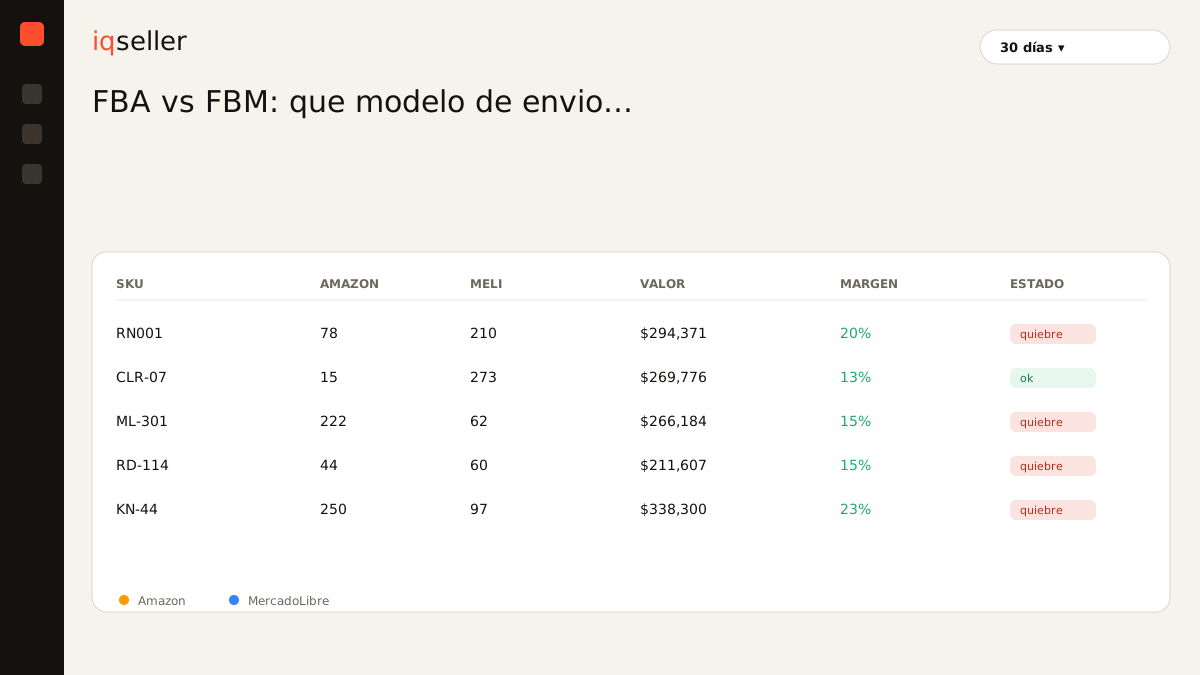
The real problem isn’t understanding the theory; it’s seeing it applied to your own catalog. When you sell on Amazon Mexico, MercadoLibre, your Shopify store and sometimes through a 3PL, every channel has its own dashboard, its own fee schedule and its own report. You end up exporting to Excel, reconciling fees by hand and deciding with data that’s three days old. That uncertainty is what costs money, not the FBA-or-FBM decision itself.
what fba is and what it solves
With FBA you ship your inventory to an Amazon fulfillment center. From there, they handle everything: storage, picking, packing, shipping, returns and first-tier customer service. Your product earns the Prime badge, which lifts conversion and makes you far more competitive for the Buy Box, the purchase box that decides which offer the buyer sees when several sellers share the same listing.
In exchange you pay two main costs: the fulfillment fee (per unit, based on weight and dimensions) and storage (monthly, per cubic foot, more expensive in peak season). There are also penalties for inventory that doesn’t move: long-term storage fees punish stock that sits past a certain age. FBA buys you speed and scale, but it charges for them.
what fbm is and when it wins
With FBM you keep the inventory and fulfill each order as it comes in. You can do it from your own warehouse, your home or a contracted 3PL. Amazon charges no fulfillment fee because it never touches your product; you only pay the category’s referral fee. That keeps your margin cleaner, especially on items where FBA fees would be disproportionate.
FBM shines on large or heavy products (where FBA’s weight/dimension cost spikes), on slow-moving items (where Amazon storage racks up penalties), on tight-margin catalogs, and when you want to control the packaging, brand inserts or timing yourself. The cost is operational: you have to meet Amazon’s shipping metrics (on-time shipment rate, cancellations, valid tracking) or your account suffers. And without the automatic Prime badge your conversion can be lower, unless you qualify for Seller Fulfilled Prime by meeting strict requirements.
the cost that actually decides
The honest comparison isn’t “FBA fee vs zero fee in FBM.” It’s your final profit per unit under each model, after referral, fulfillment, storage, returns and advertising. That number is your real net margin, and it often contradicts the gut feel. A SKU that “feels” profitable in FBA because of its speed can be losing margin against an FBM version you ship at half the cost.
That’s why the math has to be done per SKU, not per catalog. A light, fast-moving product almost always wins in FBA; a bulky, slow one almost always in FBM. Between those extremes sits most of your inventory, and that’s exactly where the precise number matters. To get it right you need to combine Amazon’s real fee with your product cost and your own shipping cost, and that information lives in separate sources. This is where manual Excel work slows you down: by the time the analysis is done, the fees have already changed.
the hybrid model: don’t pick just one
Most profitable sellers don’t choose; they combine. They put in FBA the SKUs that win on speed and Buy Box, and leave in FBM the ones that win on cost or that are seasonal. Even a single product can live in both: FBA to cover base demand with Prime, and FBM as a backup when FBA stock runs out, so you never lose your winning offer.
The hybrid’s risk is operational. If you run the same product in both FBA and FBM, your stock is split and you need to see it unified so you don’t oversell or run short. That’s where a unified catalog helps: one place where each SKU shows its total inventory, adding up what’s in Amazon, in your warehouse and in your 3PL, updated in real time. Without it, each channel tells you a different figure and you decide blind.
the numbers you need to compare
To decide FBA or FBM per product, gather these figures per SKU: sale price, referral fee, estimated FBA fee (or your own shipping cost in FBM), product cost, storage, return rate and ad spend. With that you get the profit per unit in each scenario and compare them head to head. The piece almost everyone forgets is ad spend, which can flip a margin that looked healthy.
Cross-referencing this by hand every week is exactly the multichannel seller’s pain: several dashboards, exports, an Excel that ages, and decisions made on stale data. When the information arrives in real time and already reconciled, you stop guessing. You can dig into the mechanics of shared stock in real-time inventory and into the data sources Amazon gives you in what sales reports Amazon Seller Central offers, so you don’t settle for the pretty number on the main panel instead of the real one.
how to decide, in short
Start with the product, not the trend. If it’s light, turns fast and needs Prime to win the Buy Box, FBA. If it’s heavy, bulky, slow or thin on margin and you can ship it cheaper, FBM. If you’re unsure, run the real net margin in both scenarios and let the data decide. And don’t marry a single answer for the whole catalog: review it per SKU and adjust it when fees or the season change.
FBA vs FBM isn’t a battle of camps; it’s a profitability decision product by product. What makes it hard isn’t the logistics, it’s having the real costs from all your channels in one place and up to date. Once that’s solved, choosing becomes a calculation, not a bet.