
What Is Amazon Seller Central and What Is It For
July 5, 2026
Amazon Seller Central is the web platform where a seller runs their entire Amazon business: creating listings, setting prices, managing inventory, processing orders, answering buyer messages, and getting paid for sales. If you sell (or want to sell) on Amazon as a third party, meaning you are the seller, not Amazon, then Seller Central is the control panel where your operation lives. You reach it at sellercentral.amazon.com, sign in with your seller account, and it is a completely different view from the storefront a buyer sees: the buyer sees the product page; you see everything happening behind that page.
Put plainly: when someone asks what Seller Central is, the short answer is “the back office of your Amazon store.” That is where you build listings, decide whether to use FBA (Amazon stores and ships for you) or FBM (you ship yourself), adjust stock, review your performance metrics, and see how much Amazon deposits after deducting its fees. Everything a seller needs to operate on the marketplace flows through that console.
Now the part almost no tutorial mentions: Seller Central is thorough, but it only sees Amazon. If you also sell on MercadoLibre, on your own Shopify store, or move inventory through a 3PL, Seller Central knows nothing about any of it. That is exactly where the real pain of the multichannel seller begins, which we get to below.
what seller central does day to day
In practice, Seller Central bundles four jobs that used to live in separate places. First, the catalog: here you create each listing, upload photos, write the title and bullets, assign a category, and link the product to its barcode. Second, inventory: you tell Amazon how many units you have, whether they are in your hands (FBM) or in an Amazon warehouse (FBA), and the system draws down stock as orders come in.
Third, orders: every sale lands in Seller Central with its status, and if you ship yourself, you print the label and confirm shipment there within the window Amazon requires. Fourth, the money: Amazon settles your sales on a regular cycle, subtracts referral fees, FBA charges, and any adjustments, and deposits the net. You can see that settlement, line by line, in the payments section.
Around those four jobs sit the supporting tools: advertising (Sponsored Products), promotions, coupons, buyer messaging, returns handling, and a whole battery of reports. It is a lot of power on one screen, which is why it feels overwhelming at first. The learning curve is worth it, because without Seller Central there is no way to sell as a third party on Amazon.
individual vs professional accounts
Before you create your first listing, Amazon asks you to pick a plan, and that choice changes what you can do inside Seller Central. The Individual plan charges no monthly fee but adds a flat per-unit fee on every sale, and it locks you out of several features (no advertising, no advanced reports, no Buy Box eligibility). The Professional plan charges a fixed monthly subscription regardless of how much you sell, and unlocks everything: advertising, reports, bulk product uploads, and the ability to compete for the featured offer.
The rule of thumb is simple: if you expect to sell only a handful of units a month while you test the water, Individual works; the moment your volume grows, Professional is almost always cheaper per unit and gives you the tools to scale. If you want the exact numbers of each plan and how they compare against MercadoLibre, we break it down in what is the monthly cost of Amazon Seller Central, because that is where most sellers miscalculate their margin.
Glossary: a unified catalog joins the same product from all your channels into a single record, so the listing you manage in Seller Central does not live disconnected from your real inventory.fba or fbm: who stores and ships your product
Inside Seller Central, every product runs under one of two fulfillment models, and it pays to understand them because they affect fees, timing, and even your Prime eligibility. With FBM (Fulfilled by Merchant) you hold the stock and ship each order yourself; you get more control and fewer Amazon fees, but you carry the logistics and the pressure of meeting shipping deadlines. With FBA (Fulfilled by Amazon) you send your inventory to an Amazon center, and Amazon stores, packs, ships, and handles customer service for you; you gain Prime and speed, but you pay fulfillment and storage fees that depend on each unit’s real weight and size.
Seller Central lets you mix the two: some SKUs on FBA, others on FBM, whichever suits the product. The fine print is that the FBA fee is calculated on the dimensions Amazon measures when your product arrives at the center, not on what you declared. A gram or a centimeter over can bump you into a higher tier and make every sale costlier from then on. That is why the margin you see inside Seller Central is not always the one that ends up in your bank account.
what seller central does not show you
Here is the limit. Seller Central is excellent for your Amazon operation, but it is an island. It does not see your MercadoLibre sales, it has no idea about the stock in your Shopify store, and it does not know how much inventory sits in your 3PL. If you sell the same product across several channels, Seller Central gives you half the picture, and the other half lives on three more screens in three more formats.
Every multichannel seller knows the result: to find out how much stock you actually have left of one SKU, you open Seller Central, then MercadoLibre, then your store, and you add it up by hand. To know your true net margin, you export Amazon’s fee report, Meli’s commission report, wait for the 3PL invoice, and paste them into a spreadsheet that was already stale the day you built it. And by the time you have the number, it is last week’s photo. That is the silent cost of running one console per channel.
Glossary: real net margin is what is left after subtracting commission, logistics, taxes, and returns; Seller Central computes it only for Amazon, not for your full operation.seller central and the rest of your channels, in one view
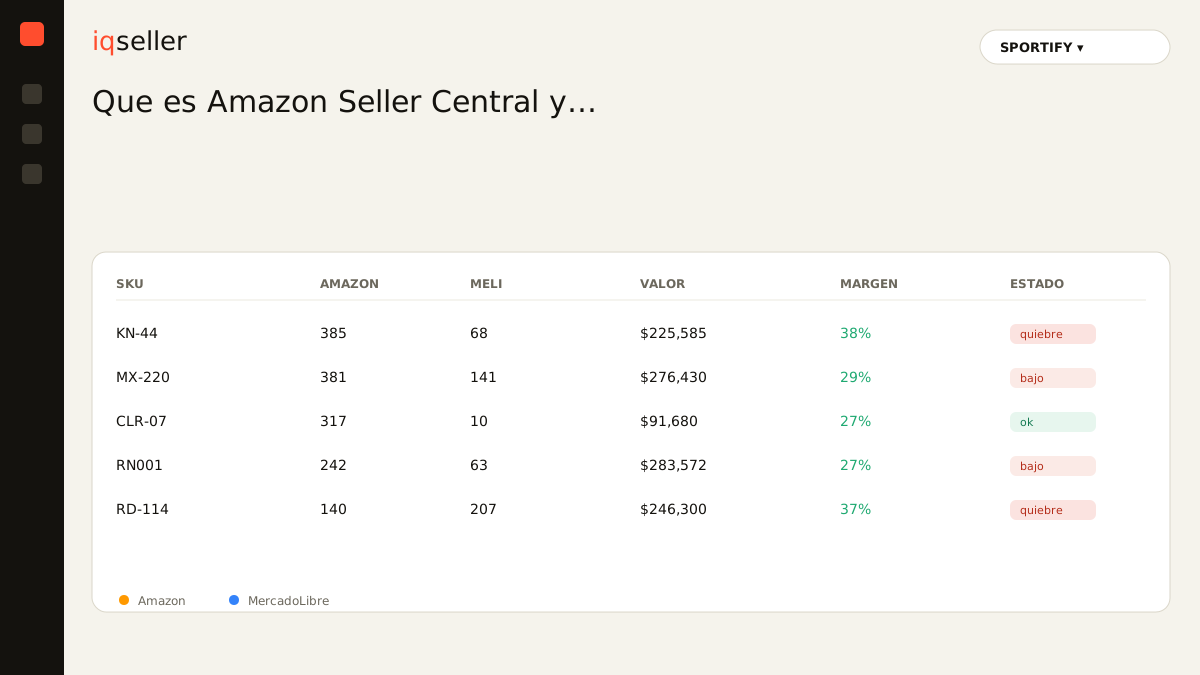
The way out is not to stop using Seller Central: it is the best tool for what it does. The way out is to stop rebuilding by hand what happens when you combine Amazon with MercadoLibre, Shopify, and your 3PL. When the stock and sales from every channel flow in automatically, mapped to the same product by its code, your real available stock stops being a manual sum and becomes a live number. Selling what you no longer have stops happening, and setting a price stops being a bet.
A panel that consolidates your channels does not replace Seller Central; it puts it in context. You still create listings and manage FBA inside Amazon, but the number you look at to decide, how much real stock there is, what margin each SKU leaves once every fee is counted, which channel to push, is no longer something you assemble yourself at midnight in a spreadsheet. That is how real-time inventory works: it takes what Seller Central knows about Amazon, joins it with everything else, and presents it as a single truth.
That is the role of iqseller alongside Seller Central: not to compete with it, but to finish the picture. Seller Central owns Amazon; the panel owns the full view. A store like SPORTIFY, selling supplements on Amazon with FBA, on MercadoLibre with Full, and shipping part through a 3PL, does not need less Seller Central. It needs everything Seller Central sees to join with what its other channels see, in real time.
Glossary: the Buy Box is the featured purchase spot on a listing; Seller Central lets you compete for it, but only the Professional plan makes you eligible.where to start
If you do not sell on Amazon yet, your first step is to create the seller account, pick a plan, and get comfortable with the four areas we covered: catalog, inventory, orders, and payments. List a test product, process an order end to end, and see what your first settlement looks like. That walkthrough teaches you Seller Central better than any manual.
If you already sell and feel like you live switching tabs, the diagnosis is different: you do not need to master Seller Central more, you need to join it with your other channels. Take your five highest-volume SKUs and, for each one, gather its stock on Amazon, on MercadoLibre, and in your store, plus its real margin per channel. If that picture takes you more than a minute to assemble, that is the leak no single console will ever plug. Seller Central will stay your home on Amazon; what you need is a window that looks at all your homes at once.