
Profitability per product: beyond it sells a lot
April 7, 2026
Every multichannel seller has said it at least once while staring at a sales report: “this product sells a ton.” And it’s true. Units fly off the shelf, the listing ranks near the top, inventory turns over fast. But when the month closes and you check how much money actually landed in the account, the figure doesn’t match the excitement. The star SKU, the one that sells the most, turns out to leave almost no profit, or worse, it eats it. That gap between what sells and what you keep is exactly the blind spot this article tries to light up.
The problem is almost never laziness. It’s visibility. Selling on Amazon Mexico, MercadoLibre, Shopify and operating through a 3PL means juggling four or five screens that speak different languages. Amazon Seller Central shows you sales and a handful of fees; MercadoLibre shows other commissions and other shipping costs; the 3PL bills storage and picking separately; and your supplier invoices the cost of goods on yet another sheet. To know what a product actually leaves you, you end up exporting everything into Excel, pasting columns by hand, and praying the formulas don’t break. By the time you have the number, it’s already old: it reflects last week, not what’s happening today with your pricing and your stock.
The consequence of deciding with yesterday’s data and margins calculated by gut is that the seller makes choices that look smart and are actually wrong: pouring ad spend into the SKU that “sells a lot” but no longer has margin, dropping the price on a product that was quietly carrying the whole month’s profit, or reordering inventory for something that loses money on every unit. Profitability per product, seen in a single source of truth and in real time, is what breaks that cycle.
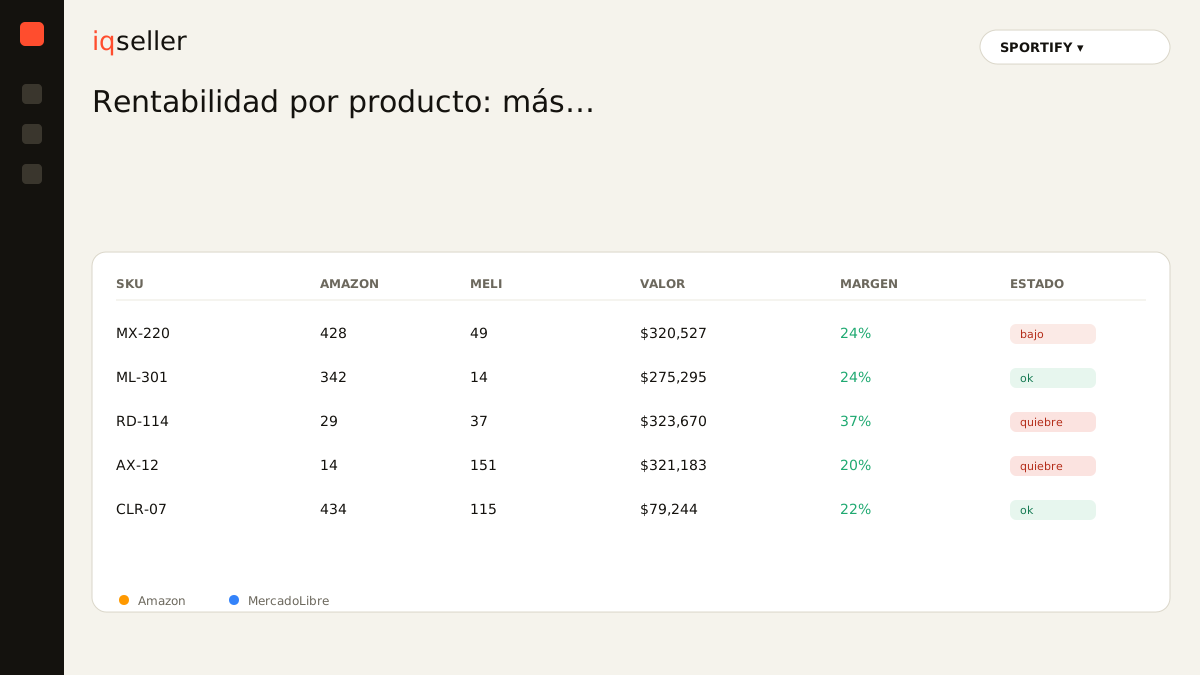
selling a lot is not earning a lot
The trap starts with the metric we have most readily at hand. Marketplaces reward and surface units sold and gross revenue because that’s what looks best: a chart that goes up. But gross revenue is the least honest figure a seller can lean on. Between what the customer pays and what you keep sits a waterfall of deductions: the marketplace commission, the fulfillment fee, the shipping cost you sometimes absorb, the cost of goods, packaging, returns, the 3PL’s storage charge, and the advertising you used to push that sale.
A product can bill hundreds of thousands of pesos a month and leave a single-digit margin, while another that sells a third as much leaves twice as much in absolute terms because its cost structure is cleaner. If you only watch the units ranking, you’ll never see that second story. That’s why “it sells a lot” is a starting point, not a conclusion: it tells you where there’s activity, not where there’s a business.
Dictionary: the real net margin is what’s left after subtracting ALL the product’s variable costs and fees, not just the cost of goods.the cost waterfall nobody sees in full
To understand profitability per product you have to rebuild the whole waterfall, SKU by SKU. Start with the real selling price (the one the customer actually paid, promotions and coupons already applied, not the list price). From there you subtract, in order: the channel commission, which varies by category and marketplace; the logistics cost, which on Amazon depends on weight and dimensions and on MELI on your reputation and shipping program; the unit cost of goods; and the costs that live outside the marketplace, like storage and handling at the 3PL.
The detail that wrecks Excel calculations is that many of these costs are neither fixed nor cleanly per-unit. The 3PL’s storage is charged by volume and by time, so a slow-moving product accumulates cost while it waits to be sold. Returns hit some SKUs far harder than others and are rarely attributed to the right product. And shipping cost can shift from one month to the next due to rate adjustments. A hand-built spreadsheet captures a snapshot; real profitability is a film, and it needs to update itself.
the hidden cost of advertising per SKU
This is where most sellers get burned. Advertising isn’t a general expense you spread evenly across all your products: it’s a cost that belongs to a specific SKU and must be subtracted from THAT SKU’s profit. When you average ad spend across the whole catalog, you hide the fact that some products live entirely off advertising while others sell on their own.
A SKU that “sells a lot” thanks to an aggressive campaign can carry an ACoS so high that, once subtracted from its already thin margin, it ends up in the red. And because the units keep moving, the illusion of success holds. That’s why it pays to see advertising and profit side by side, not in separate tabs. We go deep on this in Amazon and MELI ads in one view, but the principle is simple: a product’s margin is only true once you’ve subtracted what you spent to sell it.
Dictionary: ACoS (Advertising Cost of Sales) is the percentage of your ad-driven sales spent on ads; an ACoS higher than your margin means that sale loses money.profitability changes by channel, not just by product
The same SKU doesn’t perform the same on Amazon as on MercadoLibre. Category commissions differ, logistics programs carry different rates, and return dynamics aren’t the same. A product can be your best margin on MELI and a loser on Amazon, simply because of each channel’s fee structure. The seller who looks at a “global” product margin averages two opposite realities and loses the most actionable signal there is: where to sell what.
Seeing profitability cross-tabbed by product and by channel changes concrete decisions. It tells you on which marketplace to push each SKU with ads, where to raise or lower price, and which products are worth concentrating on one channel and pulling from the other. That kind of channel-differentiated pricing is exactly the move that becomes systematic with an automatic price calendar, instead of being left to sporadic manual reviews.
stock also defines your margin
Profitability isn’t just a subtraction of costs against price: inventory plays a silent role. A profitable product that runs out of stock stops generating profit and, worse on Amazon, loses organic rank that later costs advertising to recover, which erodes future margin. On the other side, an overstocked product piles up storage cost at the 3PL day after day, eating away at a margin that looked healthy on paper.
That’s why profitability per product and inventory management are two sides of the same coin. Knowing what a SKU leaves you without knowing how many units you really have available to sell, already net of what’s reserved and in transit, is half the picture. The decision of how much to reorder should weigh the product’s margin against its sales velocity and the cost of keeping idle stock.
Dictionary: real available stock is what you can actually sell today, net of units reserved, in transit, or blocked by the marketplace.from the manual sheet to a single source of truth
The practical shift isn’t learning a new formula: it’s no longer rebuilding the truth by hand every week. When data from Amazon, MercadoLibre, Shopify and your 3PL lands in one place and cross-references itself with your cost of goods, profitability per product stops being an end-of-month project and becomes a number that’s always there, current, ready to be checked before every decision.
That’s what a well-built profitability module does for you: it takes the real selling price, subtracts the full waterfall of fees and costs per channel, attributes advertising to the SKU it belongs to, accounts for the cost of holding stock, and hands you the real net margin per product and per marketplace. Not so you can celebrate the one that sells a lot, but so you know which one makes you money. At iqseller that’s the core idea of the module: that the seller stops deciding on the euphoria of units and starts deciding on real profit, seeing the same thing their accountant would see, but today and not next month.
The SPORTIFY seller who one day discovers that their best-selling product barely covers shipping, and that a modest accessory was the one carrying the month, didn’t have a bad month: they had a bad dashboard. Changing the dashboard changes the conversation, and with it, which products you push, at what price, and on which channel.